Sunday, July 30, 2017

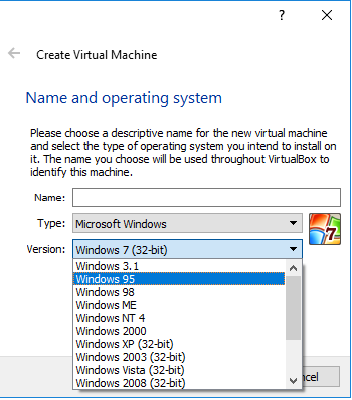
VirtualBox Issue: "Create Virtual Machine" wizard only shows 32 bit guest versions in "Version" dropdown

Recently I have came across very strange problem while creating Virtual Machine(VM) using Oracle VM VirtualBox.I was planning to install the 64 bit CentOS as the Guest OS on my 64 bit Windows Host but the Version drop-down in the Create Virtual Machine wizard didn't have any 64 bit options. Through VirtualBox documentation, I have checked the details of supported Host OS & Guest OS and found that it also supports 64 bit Guest OS. Therefore it's a problem with my system configuration. 


In this "How To" guide, we would discuss how to resolve the above issue so that if you face the similar issue then you could also easily troubleshoot the issue.
Friday, July 21, 2017

VM creation using VirtualBox Issue: "FATAL: No bootable medium found! System halted."

Have you came across below error while trying to start your newly created Virtual Machine (VM) using Oracle VM VirtualBox :


The error states that : FATAL: No bootable medium found! System halted.

This error message tells us two things:
  • No bootable medium found: we haven't specified the Guest OS for our Virtual Machine (VM) while configuring the VM system configurations. 
  • System halted: in absence of an OS, how can any system start, that's why our VM system is halted.
This article is kind of How To Guide to show the steps with screenshots to fix the above issue.

Thursday, July 13, 2017

Error response from daemon: Docker push already in progress

It's relatively common that one would tend to interrupt the current ongoing process of uploading assets on the cloud and try it again when it's taking too much time to upload. With Docker, you might face below issue i.e "Docker push already in progress" if you interrupt the docker push command and try running it again for publishing your image to the Docker repository i.e Docker Hub.


The error states that: Error response from daemon: push <username>/<repository> is already in progress.
From the error message, it's clear that push/upload is still running in the background but we are unable to see it's progress. If one can wait to finish the current docker push then the problem will automatically resolve. 

In this article, we would discuss the circumstances that may leads to the above issue and the resolution of this issue i.e how to get back the docker push progress bar.

Friday, June 30, 2017

A Quick Guide for MySQL Installation on Linux using the MySQL Yum Repository

Hello Guys, today I am writing this piece because, one of my close friend is struggling hard to install MySQL on his CentOS system. Although he was well aware of how to install, update or remove any software package using YUM but still he was out of luck. Someone might also face the same problem. This article would help all those who wants to install MySQL on different Linux distribution whether it is EL5-, EL6-, EL7- based platforms (Oracle Linux, Red Hat Enterprise Linux, CentOS) or Fedora 24 & 25. Depending upon requirement, one might want to install MySQL using a third-party-distributed RPM package but that is out of scope from this article.

Note: While writing this piece, I will be installing the MySQL 5.7 on Red Hat Enterprise Linux (CentOS 6.7).
In this article we would discuss below points:
Why MySQL Yum Repository?
How to add the MySQL Yum Repository to our system's repository list?
Which version of MySQL to install?
How to install MySQL using YUM?
How to start the MySQL Server?
Recap! What we did?

Wednesday, June 28, 2017

How to Remove Comment Box from Static Pages in Blogger

In Blogger, if one enables the commenting functionality then by default comment box would appear below all the posts and static pages. It's recommended and good practice to always hide comment box on static pages like Contact Us, About us etc.

This is "How To" guide for new bloggers showing the steps with screenshots to hide/remove comments box from an existing page or from the new page.

Tuesday, June 27, 2017

How to Resolve YUM Lock Issue : Another app is currently holding the yum lock; waiting for it to exit...

If you are Linux user or System Administrator then you might face below issue while trying to use YUM command for software package management. It's a very common issue.


The error states that :
Existing lock /var/tmp/yum-vagrant-qt0qu8/x86_64/6/yum.pid: another copy is 
running as pid 5025.
Another app is currently holding the yum lock; waiting for it to exit...
  The other application is: yum
    Memory :  20 M RSS (310 MB VSZ)
    Started: Mon Jun 26 10:49:35 2017 - 00:14 ago
    State  : Traced/Stopped, pid: 5025
This error message tells us two things:
  • There is another yum instance running by some processes that are holding the lock.
  • The origin of this situation implies that the system does not support YUM concurrent operations.
This is "How To" guide in which we would discuss the solution / workaround of this problem.

Monday, June 26, 2017

YUM Command For Package Management with Examples

It's very common tasks for user or system administrator to install, uninstall, search and update the software packages on Linux systems by using some kind of package manager utility like apt-get, dpkg, rpm, yum, etc.

In this article, we would discuss about one of the software package management utility i.e. YUM. We would discuss different yum commands to search/install/update/remove different software packages.

Points Of Discussion:
What is YUM ?
Different YUM commands
Different Real World Use Cases